
If you have spent any time searching for embroidery software, you have probably come across the name Embrilliance more than once. It shows up in Facebook groups, YouTube tutorials, and recommendations from other stitchers who swear by it. But once you land on the website and see the different product names, things can get confusing fast.
Which one do you actually need? Do you need all of them? What is the real difference between Essentials and Enthusiast, or between those two and StitchArtist?
This guide breaks down Embrilliance in plain language. By the end, you will know exactly which version fits your embroidery goals, your budget, and your skill level, without the guesswork.
What Is Embrilliance
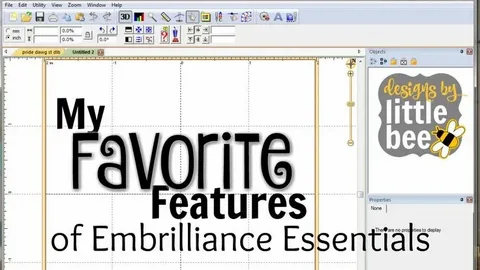
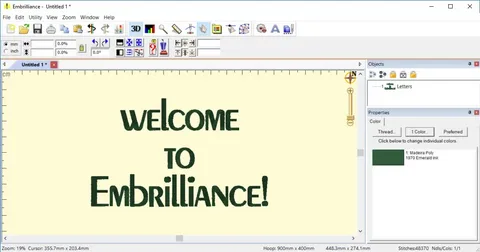
Embrilliance is a family of embroidery software programs developed by BriTonLeap, designed to help hobbyists and professionals edit, combine, and create machine embroidery designs. Unlike many embroidery software brands that lock you into one operating system, Embrilliance runs natively on both Mac and Windows.
That single detail matters more than it might seem. A large portion of the embroidery community uses Mac computers, and for years, many popular embroidery programs simply were not built for them. Embrilliance closed that gap early on, which is part of why it built such a loyal following.
The software is not one single program. It is a lineup of separate titles, each built for a different stage of the embroidery process, from simple editing to full digitizing from scratch.
Why So Many Embroiderers Choose Embrilliance
Beyond cross platform support, a few things consistently come up when embroiderers talk about why they picked Embrilliance over competitors.
First, there is the licensing model. Embrilliance does not use dongles or activation keys tied to a single machine. Once you own a license, you can install it on every computer you use, including both a Mac and a Windows machine, with no extra installs to buy.
Second, commercial use is allowed without an upcharge. If you run a production embroidery shop with several employees working on different computers, you do not need to purchase separate business licenses for each seat.
Third, the pricing sits in a reasonable middle ground. It is not the cheapest software on the market, but it is far more accessible than many professional digitizing suites, which can cost several times more.
Embrilliance Essentials Explained
Essentials is the entry point into the Embrilliance lineup and the program most beginners start with. It is not a digitizing tool, meaning it will not convert a photo or piece of artwork into stitches. Instead, it focuses on editing and combining designs you already own.
With Essentials, you can:
- Merge multiple embroidery designs together, even ones stored inside ZIP files
- Resize designs while the software recalculates the stitch count, rather than just stretching the stitches
- Remove overlapping stitches between layered elements
- Add lettering in multiple styles, including monogram, multi line, and circular text
- Colorize designs and convert thread colors between brands with a couple of clicks
For someone who buys embroidery files online and wants to personalize them with a name, resize them for a different hoop, or clean up messy stitch files, Essentials genuinely covers most of what they need. It also includes applique tools that let you adjust placement and material colors without disturbing the original stitch structure.
Embrilliance Enthusiast: The Step Up
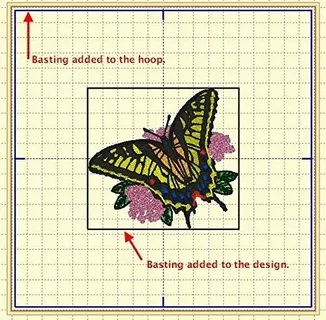
Enthusiast builds directly on top of Essentials and adds a layer of editing control for people who want more precision. Where Essentials treats a design as a set of complete objects, Enthusiast allows you to work at the individual stitch level.
One feature that regularly gets praised by users is the knockdown stitch option. This adds an underlying layer of stitching before the main design is applied, which helps keep the top design from sinking into thick or plush fabrics like towels and blankets. Anyone who has tried to embroider a heavy terry cloth towel knows how frustrating it can be when the detail gets swallowed by the fabric texture, so this feature solves a real and common problem.
Enthusiast is best suited for embroiderers who have outgrown basic editing and want finer control over how a design behaves on different fabric types, without jumping all the way into full digitizing software.
Embrilliance StitchArtist: Digitizing From Scratch
StitchArtist is the digitizing tool in the Embrilliance family, and it works differently from Essentials and Enthusiast. Rather than editing existing embroidery files, StitchArtist lets you create entirely new designs from artwork or freehand drawing.
You can import an image, trace over it, and StitchArtist will generate the underlying stitches automatically based on the shapes you define. It also supports applique creation, including placement guides, tacking stitches, and finishing options like satin or blanket stitch edges.
StitchArtist comes in different levels, with each higher level unlocking more advanced digitizing tools and stitch types. This tiered approach means you can start with basic digitizing and upgrade later if your needs grow, rather than paying for advanced features you are not ready to use.
This program is the right choice for anyone who wants to turn their own artwork, logos, or hand drawn designs into embroidery files, rather than relying only on designs purchased from other sites.
Embrilliance Thumbnailer: A Small Tool With a Big Job
Thumbnailer does not get as much attention as the other titles, but it solves an everyday annoyance for anyone with a large embroidery design library. It generates visual thumbnail previews of your embroidery files directly in your computer’s file browser, so you can see what a design looks like without opening it first.
If you have ever scrolled through a folder full of cryptically named DST or PES files trying to remember which one was which, Thumbnailer removes that guesswork entirely.
Embrilliance Version Comparison
| Feature | Essentials | Enthusiast | StitchArtist |
|---|---|---|---|
| Merge and resize designs | Yes | Yes | Not applicable |
| Individual stitch editing | No | Yes | Yes |
| Knockdown stitch | No | Yes | Yes |
| Create designs from artwork | No | No | Yes |
| Lettering and monogramming | Yes | Yes | Limited |
| Best for | Beginners personalizing purchased designs | Intermediate editors wanting more control | Anyone digitizing original artwork |
Which Embrilliance Product Should You Buy
The right starting point depends entirely on what you actually plan to do with your embroidery machine.
If you mainly buy embroidery designs online and want to add names, resize them, or combine a few elements together, Essentials will likely cover everything you need for a long time. Many long time embroiderers never feel the need to upgrade beyond it.
If you find yourself wanting more control over how stitches behave, especially on tricky fabrics, or you want to edit at a more granular level, Enthusiast is worth the upgrade.
If your goal is to create your own designs from scratch, whether that means turning a hand drawn sketch into a design or converting a business logo into an embroidery file, StitchArtist is the tool built for that job. It is a different kind of software than Essentials and Enthusiast, so think of it as an addition rather than a replacement.
Licensing, Installs, and Platform Compatibility
One of the more practical advantages of Embrilliance is how flexible the licensing is. A single purchase covers use on any number of your own computers, and since the software runs natively on both Mac and Windows, you are not locked into one operating system if your setup changes over time.
There are no dongles to plug in and no activation codes tied to specific hardware. If your computer dies or you switch to a new one, reinstalling does not eat into a limited number of activations, which is a common frustration with other embroidery software licensing models.
Commercial embroidery businesses can also install the software across every workstation in their shop under a single license, which is a meaningful cost saving for shops with multiple employees.
File Formats and BX Fonts
Embrilliance works with a wide range of common embroidery file formats, so designs purchased from most reputable design sites should open without issue. One format worth knowing about specifically is BX, which is a font format built for the Embrilliance platform.
BX fonts let you type lettering directly using your keyboard, similar to using a font in a word processor, rather than importing individual letter files and manually spacing and aligning each one. Most established embroidery font sellers now offer their fonts in BX format specifically because of how widely used Embrilliance is in the community.
Tips for Getting the Most Out of Embrilliance
- Start with Essentials even if you think you will need more, since it will teach you the interface logic that carries over into Enthusiast and StitchArtist
- Use the applique tools to remove hidden top stitches when layering designs, which produces a noticeably cleaner finished product
- Build a custom thread color palette early on so future colorizing is fast and consistent
- If you dedicate a computer to embroidery work, install Embrilliance on it and your personal laptop, since both are covered under one license
Final Thoughts
Embrilliance earns its reputation in the embroidery community by being genuinely accessible, both in terms of price and platform support. Rather than forcing every user into one program, it offers a lineup that scales with your skills, from Essentials for everyday editing, to Enthusiast for finer control, to StitchArtist for full digitizing.
Start by being honest about what you actually need to accomplish. If you are personalizing purchased designs, Essentials is likely your answer. If you want to create original artwork based designs, StitchArtist deserves a serious look. Either way, the flexible licensing means your investment carries forward as your embroidery skills and ambitions grow.